
Computer Networking Basics: Explained for Beginners
Introduction
This guide is created especially for complete beginners who want to learn computer networking from the ground up. It is ideal for self-learners, diploma and degree students, and freshers studying computer science, information technology, or related fields. Even if you have zero prior knowledge of networking, this guide will help you get started with confidence.
In this guide, you will learn the fundamental concepts of computer networking that every beginner must understand. You’ll become familiar with basic networking terms, explore different types of networks such as LAN, WAN, and Wi-Fi, and understand how data travels from one device to another. All explanations are kept simple and supported by real-life examples, so you can learn without feeling overwhelmed by technical jargon.
For best results, read this guide step by step from beginning to end. Each section builds on the previous one, making it easier to understand new topics as you move forward. This article is part of a larger beginner networking series. After completing it, you can continue with other core topics such as the OSI model, IP addressing, networking devices, and network services.
Think of this guide as the foundation of computer networking. Once your basics are clear, learning advanced networking concepts will become much easier and more enjoyable.
2. What Is a Computer Network?
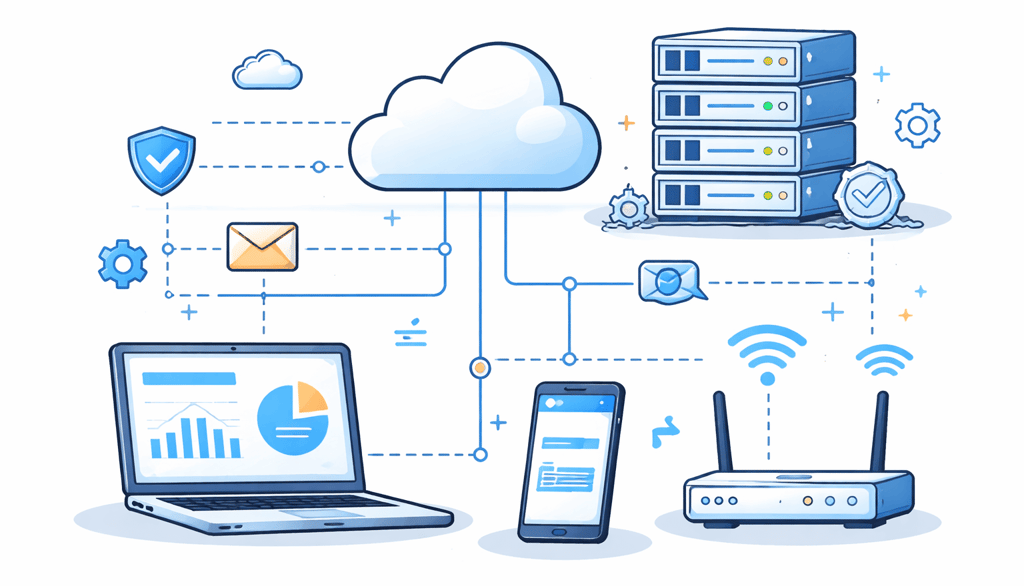
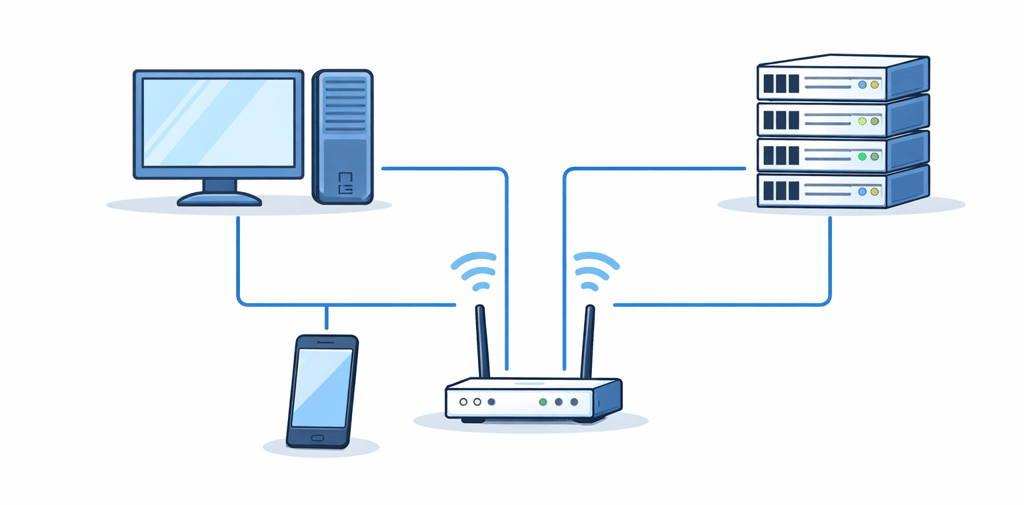
A computer network is a group of two or more devices connected together so they can share data and resources. These devices may include computers, laptops, mobile phones, printers, or servers. When devices are connected using cables or wireless signals and can communicate with each other, this connection is called a computer network.
In simple terms, a computer network allows devices to talk to each other and work together.
2.1 Simple Definition and Idea
A computer network means connecting two or more devices so they can share information and resources.
You use computer networks in everyday life, often without realizing it:
Home Wi-Fi: Your mobile phone, laptop, and smart TV are connected through a router.
Office network: Multiple computers are connected to share files, printers, and emails.
College computer lab: All systems are connected so students can access servers and learning resources.
Café Wi-Fi: Many users connect to the internet at the same time using one wireless network.
All these are real-life examples of computer networks.
2.2 Goals of Computer Networks
Computer networks are created to achieve several important goals:
Resource sharing: Devices can share printers, files, storage, and servers instead of having separate resources for each system.
Communication: Networks allow users to send emails, messages, make video calls, and transfer files between devices.
Internet access: Computer networks make it possible to browse websites, watch videos, and use online services.
Central management: In larger networks, administrators can manage users, security, data, and software from a single central system.
These goals make computer networks efficient, cost-effective, and essential in modern life.
3. Types of Computer Networks (PAN, LAN, MAN, WAN, CAN, SAN)
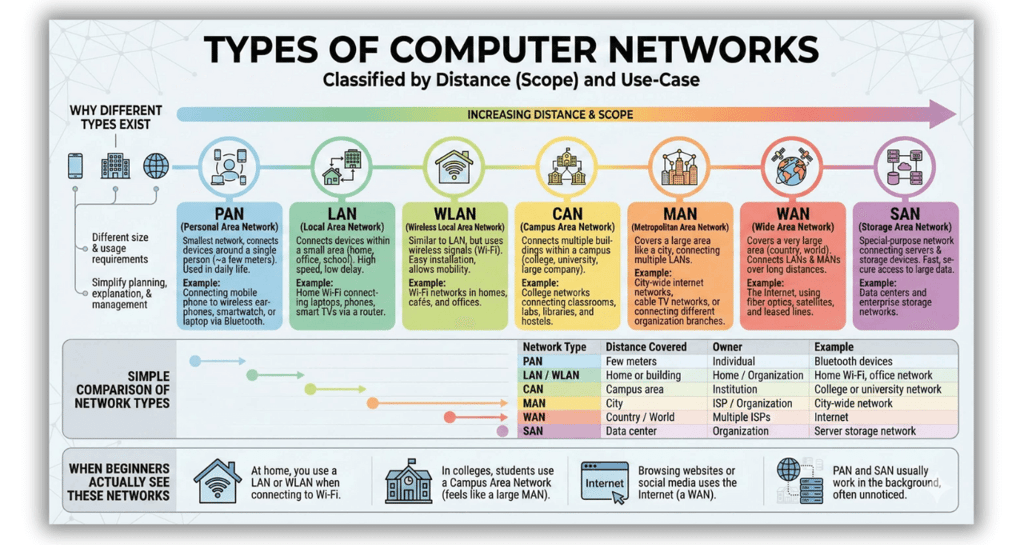
Computer networks are divided into different types because all networks are not used for the same purpose. Some networks are very small and cover only a few meters, while others cover large areas such as cities, countries, or even the entire world.
The two main reasons different types of networks exist are distance (scope) and use-case. For example, connecting your mobile phone to your laptop requires a very small network, while connecting millions of computers across the world requires a very large network. To make networks easier to understand, design, and manage, they are classified into different types.
3.1 Why Different Types of Networks Exist
Different network types exist because network size and usage requirements are different.
A small personal connection needs only a short distance.
An office or building needs a medium-sized network.
Cities, campuses, and the internet require large-scale networks.
By classifying networks based on distance and purpose, networking becomes simpler to plan, explain, and manage.
3.2 Overview of Each Type of Network
PAN (Personal Area Network)
A PAN is the smallest type of network and is used to connect devices around a single person. It usually covers only a few meters. Common examples include connecting a mobile phone to wireless earphones, a smartwatch, or a laptop using Bluetooth. PAN is widely used in daily life, often without people noticing it.
LAN (Local Area Network)
A LAN connects devices within a small area, such as a home, office, or school building. Home Wi-Fi is a common example, where laptops, phones, and smart TVs connect through a router. LANs are usually owned and managed by one person or organization and offer high speed and low delay.
WLAN (Wireless Local Area Network)
A WLAN is similar to a LAN, but it uses wireless signals instead of cables. Wi-Fi networks are WLANs. Most homes, cafés, and offices today use WLAN because it is easy to install and allows users to move freely.
MAN (Metropolitan Area Network)
A MAN covers a large area such as a city or large town. It connects multiple LANs together. Examples include city-wide internet networks, cable TV networks, or networks connecting different branches of an organization within the same city.
WAN (Wide Area Network)
A WAN covers a very large area, such as a country or the entire world. The Internet is the largest example of a WAN. WANs connect LANs and MANs over long distances using technologies like fiber optics, satellites, and leased lines.
CAN (Campus Area Network)
A CAN is used to connect multiple buildings within a campus, such as a college, university, or large company campus. It is bigger than a LAN but smaller than a MAN. College networks connecting classrooms, labs, libraries, and hostels are common examples.
SAN (Storage Area Network)
A SAN is a special-purpose network used to connect servers and storage devices. It is mainly used in data centers and large organizations to provide fast and secure access to large amounts of data. Beginners usually do not interact with SAN directly, but it plays a critical role in enterprise environments.
3.3 Simple Comparison of Network Types
3.4 When Beginners Actually See These Networks
In real life, beginners usually interact with only a few network types:
At home, you use a LAN or WLAN when you connect to Wi-Fi.
In colleges or universities, students use a Campus Area Network, which may feel large like a MAN.
When browsing websites or using social media, you are using the Internet, which is a WAN.
Networks like PAN and SAN usually work in the background and are not directly noticed by most users.
4. Network Models: Client-Server vs Peer-to-Peer
In computer networking, a network model explains how devices communicate with each other and how resources are shared. Every beginner must understand two very common network models: Client-Server and Peer-to-Peer. These models are used in almost all real-world networks, from small homes to large organizations.
4.1 Client-Server Model
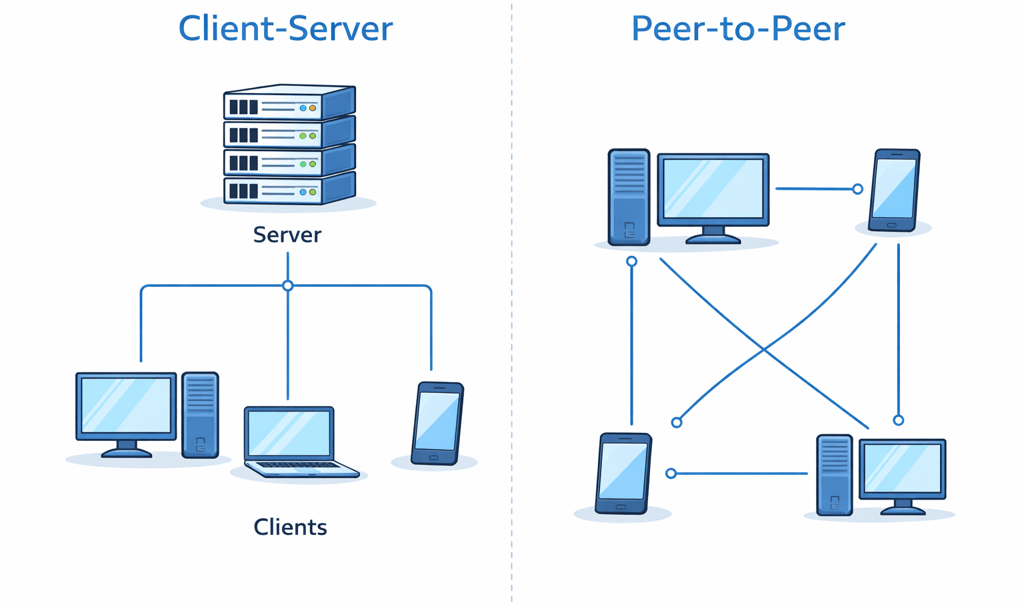
The Client-Server model is a network model where there is one central computer called a server and many other computers called clients. The server stores data, files, applications, or services, and the clients send requests to the server to access these resources.
A common example is a college computer lab, where all student computers connect to a central server for login, software access, and file storage. Company networks also use this model, where employees’ computers connect to servers for email, databases, and internal applications.
Advantages:
Central control of data and users
Better security
Easy management of resources
Disadvantages :
More expensive to set up
Requires technical knowledge to manage
4.2 Peer-to-Peer (P2P) Model
The Peer-to-Peer model is a simpler network model where all devices are equal and share resources directly with each other. There is no central server. Each device can act as both a client and a server.
This model is commonly used in small home networks, hostel rooms, or very small offices. For example, two computers sharing files directly using Wi-Fi or a cable form a peer-to-peer network.
Advantages:
Easy to set up
Low cost
No need for a dedicated server
Disadvantages:
Poor security
No central management
Difficult to handle many users
4.3 Where You’ll Meet These in Real Life
In real life, both models are used depending on the environment:
Homes and small offices usually use the Peer-to-Peer model because it is simple and affordable.
Colleges, companies, banks, and IT organizations use the Client-Server model because it offers better control, security, and performance.
As a beginner, understanding these two network models will help you clearly understand how modern networks are designed and managed.
5. Basic Networking Performance Terms
When people say a network is fast or slow, they are usually talking about network performance. To understand network performance, beginners must learn a few basic terms. The most important ones are bandwidth, throughput, latency, and jitter. These terms explain how well a network works in real-life situations.
5.1 Bandwidth and Throughput
Bandwidth refers to the maximum amount of data that can pass through a network connection in a given time. You can think of bandwidth like the width of a road. A wider road allows more vehicles to travel at the same time.
For example, when you watch YouTube videos in HD, higher bandwidth allows the video to play smoothly without buffering.
Throughput is the actual amount of data that is successfully transferred over the network. Even if a network has high bandwidth, the real speed you experience while downloading a file is called throughput. In most cases, throughput is lower than the maximum bandwidth.
5.2 Latency and Jitter
Latency is the time delay it takes for data to travel from one device to another. Low latency means data reaches quickly, while high latency causes noticeable delays.
Latency is very important in online games and video calls, where even a small delay can cause lag.
Jitter refers to the variation in delay. If data packets do not arrive at a steady pace and instead arrive at different times, jitter occurs. High jitter can cause video calls to freeze, voices to break, or games to feel unstable.
5.3 Putting It Together
When a user says, “my network feels slow,” it is usually due to one or more of these performance factors:
Low bandwidth can cause buffering
Low throughput can slow file downloads
High latency can cause delays
High jitter can disrupt real-time communication
Understanding these basic networking performance terms helps beginners identify why a network is not performing well and makes it easier to learn advanced networking concepts later.
6. Signals and Transmission Media
In computer networking, signals are used to carry data from one device to another, and transmission media are the paths through which these signals travel. Every message, file, image, or video you send over a network is converted into signals and transmitted through some type of medium, either using cables or wireless technology.
6.1 Analog vs Digital Signals
Analog signals are continuous signals that change smoothly over time.
Digital signals are discrete signals that use only two values, usually 0 and 1.
Traditional telephone systems used analog signals to carry voice. Computer networks mostly use digital signals because they are more reliable, faster, and less affected by noise.
For example, data sent through an Ethernet cable uses digital signals, which makes data transmission more accurate compared to older analog telephone lines.
6.2 Guided vs Unguided Transmission Media
Transmission media are divided into guided and unguided media.
Guided Media
Guided media use physical cables to guide signals from one device to another. Common types include:
Twisted pair cables, widely used in Ethernet and telephone networks
Coaxial cables, used in cable TV and some internet connections
Fiber optic cables, which use light signals and provide very high speed over long distances
Fiber optic cables are commonly used in backbone networks and high-speed internet connections.
Unguided Media
Unguided media do not use cables and instead transmit signals through air or space. These include:
Wi-Fi
Radio waves
Infrared
Satellite communication
Wi-Fi is commonly used in homes, offices, and cafés, while satellite communication is used for long-distance and remote-area connectivity. Unguided media offer mobility and convenience but can be affected by interference and obstacles.
6.3 Choosing the Right Medium
Choosing the correct transmission medium depends on several factors:
Distance
Required speed
Cost
Environment
For short distances and low cost, twisted pair cables or Wi-Fi are commonly used. For very high speed and long distances, fiber optic cables are the best choice. Understanding these basics helps beginners see why different networks use different transmission methods.
7. How Data Is Transferred: Switching and Transmission Modes
In computer networks, data does not move randomly from one device to another. There are specific methods that decide how data is sent, received, and delivered. These methods are known as switching techniques and transmission modes. Understanding these basics helps beginners clearly see how modern networks, including the internet, actually work.
7.1 Circuit, Packet, and Message Switching
Circuit Switching
Circuit switching is a method where a dedicated communication path is established between the sender and the receiver before data transfer begins. This path remains reserved for the entire communication session. Traditional telephone networks are a classic example. The advantage of circuit switching is consistent quality, but the disadvantage is that the connection remains occupied even when no data is being sent, which wastes network resources.
Packet Switching
Packet switching is the method used in modern computer networks and the internet. In this technique, data is broken into small units called packets. Each packet may travel through a different path to reach the destination and is reassembled at the receiver’s end. Activities like browsing websites and sending online messages use packet switching. It is efficient, flexible, and allows many users to share the same network, which is why packet switching is preferred in today’s data networks.
Message Switching
Message switching is an older technique where the entire message is sent and stored at intermediate devices before being forwarded to the next device. There is no dedicated path. This method was used in old telegraph systems and early email systems. It is rarely used today because it is slow and requires large storage at each intermediate node.
7.2 Synchronous vs Asynchronous Transmission
Data transmission can be either synchronous or asynchronous.
In synchronous transmission, the sender and receiver use a common clock signal, and data is sent continuously in a steady stream. This method is fast and efficient and is commonly used in high-speed networks.
In asynchronous transmission, data is sent one character at a time using start and stop bits, and no shared clock is required. Beginners often encounter asynchronous transmission in basic serial communication, such as simple device-to-device connections.
7.3 Simplex, Half-Duplex, and Full-Duplex Communication
Another important concept in data transfer is the direction of data flow.
Simplex: Data flows in only one direction, such as a TV broadcast.
Half-duplex: Data flows in both directions, but not at the same time, like walkie-talkies.
Full-duplex: Data flows in both directions at the same time, such as a phone call or modern Ethernet networks.
8. Core Networking Terminology
Below are some basic networking terms that every beginner must know. These terms appear very frequently in textbooks, exams, interviews, and real networking discussions, so understanding them early will make learning computer networking much easier.
8.1 Basic Terms Every Beginner Must Know
Node: Any device connected to a network, such as a computer, printer, router, or mobile phone.
Host: A node that can send or receive data on a network, usually a computer or a server.
NIC (Network Interface Card): A hardware component that allows a device to connect to a network using a cable or wireless connection.
Protocol: A set of rules that devices follow to communicate with each other, including how data is sent, received, and understood.
Port: A logical number used to identify specific services or applications running on a device, such as web or email services.
Packet: A small unit of data sent over a network; large data is broken into packets before transmission.
Frame: A packet with extra information added by the data link layer for delivery within a local network.
Medium: The path through which data travels, such as cables (Ethernet, fiber) or wireless signals (Wi-Fi).
Topology: The physical or logical layout that shows how devices are connected in a network.
Bandwidth: The maximum amount of data that can be transmitted over a network connection in a given time.
Conclusion
Computer networking often feels confusing at the beginning, and that’s completely normal. If you felt a bit lost before reading this guide, that’s exactly who it was written for.
By now, you’ve learned the core ideas what a network is, how devices connect, how data moves, and the basic terms that keep coming up everywhere.
This is your foundation. Don’t rush it. If anything still feels unclear, just move to the next beginner posts on this blog, like the OSI model, IP addressing, or networking devices, and things will start to connect naturally.
Read one topic at a time, come back when needed, and trust the process networking only feels hard until the basics click.


© 2025 AI Felicia. All rights reserved. | Privacy Policy | Terms and Conditions | Affiliate Disclosure